


Learn how to use Google Search Console for keyword research, discover ranking opportunities, improve CTR, and grow organic traffic for free.
How to Use Google Search Console for Keyword Research in 2026
Google Search Console is one of the most useful free SEO tools for website owners who want to understand how people discover their content through Google Search. Instead of guessing which keywords might bring visitors, you can use Search Console to discover the actual search queries that display your website in search results.
For new websites, this information can help identify keyword opportunities, improve existing articles, and understand why some pages receive impressions but few clicks. You do not need a paid SEO subscription to begin.
In this guide, you will learn how to use Google Search Console for keyword research, find pages with growth potential, improve search visibility, and develop a practical SEO strategy for your website.
What Is Google Search Console?
Google Search Console is a free service from Google that helps website owners monitor their site’s performance in Google Search. It provides information about search queries, clicks, impressions, click-through rate (CTR), and average search position.
You can also use it to check whether Google has indexed a URL and identify certain technical or indexing issues.
Visit the official Google Search Console website to get started.
Why Is Search Console Useful for Keyword Research?
Traditional keyword research often begins with a list of possible search terms. Search Console adds another source of information: queries for which your website has already appeared in Google Search.
For example, a technology website might discover that an article is appearing for searches related to free SEO tools, keyword research for beginners, or improving website traffic.
These are illustrative examples, not actual performance data. Your own report will show queries relevant to your website when data is available.
Search Console can help you:
- Discover search queries that already show your pages.
- Identify pages that receive impressions but few clicks.
- Find related topics for future articles.
- Understand which pages perform best in Google Search.
- Track changes after updating titles or article content.
Step 1: Set Up Google Search Console
Before researching keywords, make sure your website is connected to Search Console.
- Open Google Search Console.
- Sign in with your Google account.
- Add your website as a property.
- Verify ownership using one of Google’s available verification methods.
- Open your website property and allow time for search performance data to appear.
If you have already completed these steps, you can move directly to the Performance report.
Important: Search Console data is not necessarily available immediately after setup. A newly published or recently indexed page may need time to accumulate meaningful impressions and clicks.
Step 2: Open the Performance Report
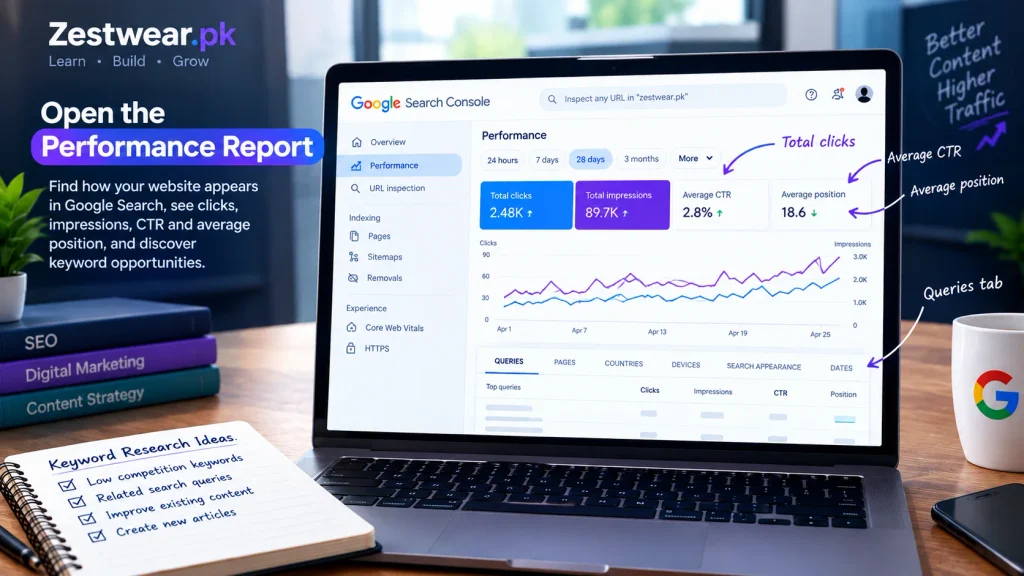
After selecting your website property, open Performance → Search results.
This report helps you understand how your website appears in Google Search. Four important metrics are available:
- Total clicks: How many times users clicked through from Google Search to your website.
- Total impressions: How often links to your website appeared in search results.
- Average CTR: The percentage of impressions that resulted in clicks.
- Average position: The average position of your topmost result across the relevant searches.
CTR is calculated by dividing clicks by impressions and multiplying by 100.
For example, if a page receives 10 clicks from 500 impressions, its CTR is 2%. This is a mathematical example, not a benchmark for every website.
Google explains these metrics in its official Search Console Performance report guide.
Step 3: Find Keywords in the Queries Tab
The Queries tab is one of the most useful places to start keyword research.
It shows search terms associated with your website’s search performance data. Review the list and look for queries that are relevant to the article or topic you want to improve.
For example, if you publish an article about keyword research, you might look for queries related to:
- Finding low-competition keywords.
- Free keyword research tools.
- SEO for new websites.
- Improving organic search traffic.
- Keyword research for beginners.
These examples illustrate the type of related terms to look for; they are not guaranteed to appear in your report.
How to Evaluate a Search Query
For each relevant query, ask three questions:
- Is it relevant? Does the query match the purpose of your article?
- Does the page answer it? Can a reader find a clear and complete answer in your content?
- Is there an opportunity? Does the query suggest that a title, introduction, section, or existing article could be improved?
Do not add every query to your article. Choose terms that match the reader’s intent and fit naturally into your content.
For more keyword discovery methods, see our guide to [how to find low-competition keywords for a new website in 2026].
Step 4: Find Pages With Impressions but Few Clicks
A page can appear in Google Search many times without receiving many visits. This is an opportunity to investigate, but it does not automatically mean the page is performing badly.
In the Performance report:
- Open the Pages tab.
- Review pages that have impressions.
- Compare their clicks and CTR.
- Select a page you want to investigate.
- Return to the Queries tab to see which searches are associated with that page.
Look for queries that are relevant to the page but may not be addressed clearly in its title or content.
How to Improve a Page With Low CTR
If a page has relevant impressions but few clicks, consider the following improvements:
- Write a clear title that accurately describes the article.
- Make the main benefit or answer easy to understand.
- Improve the meta description to summarize the page honestly.
- Match the introduction to the searcher’s question.
- Check whether the content answers the query better than a generic explanation would.
Google may generate a search snippet from page content rather than using your meta description exactly as written. Therefore, a well-written meta description can help describe the page, but it does not guarantee that Google will display it or that users will click.
Avoid misleading titles, exaggerated promises, and keyword stuffing. The search result should accurately represent the page.
Step 5: Find Keywords for Existing Articles
Search Console can help you improve content that you have already published instead of creating a completely new article for every keyword.
Choose an article in the Pages tab, then inspect the related queries.
Suppose a page about free SEO tools appears for searches about checking website performance. If the article already covers the topic, you could improve the relevant section with a clearer explanation and a useful example.
However, if the query asks a substantially different question, a separate article may be more appropriate.
Before creating a new page, check whether an existing article already answers the same search intent. Several pages targeting nearly identical queries can create unnecessary overlap.
Update Content Without Over-Optimizing
When updating an existing article:
- Keep the main topic and search intent clear.
- Add genuinely useful information where a gap exists.
- Use related keywords naturally in relevant headings and paragraphs.
- Remove outdated or inaccurate information.
- Add internal links to related guides when they help the reader.
- Update the article date only when your publishing process and the changes justify doing so.
Do not rewrite an entire article simply because a keyword appears in Search Console. Make changes that improve the page for its intended audience.
Step 6: Discover Topics for New SEO Articles
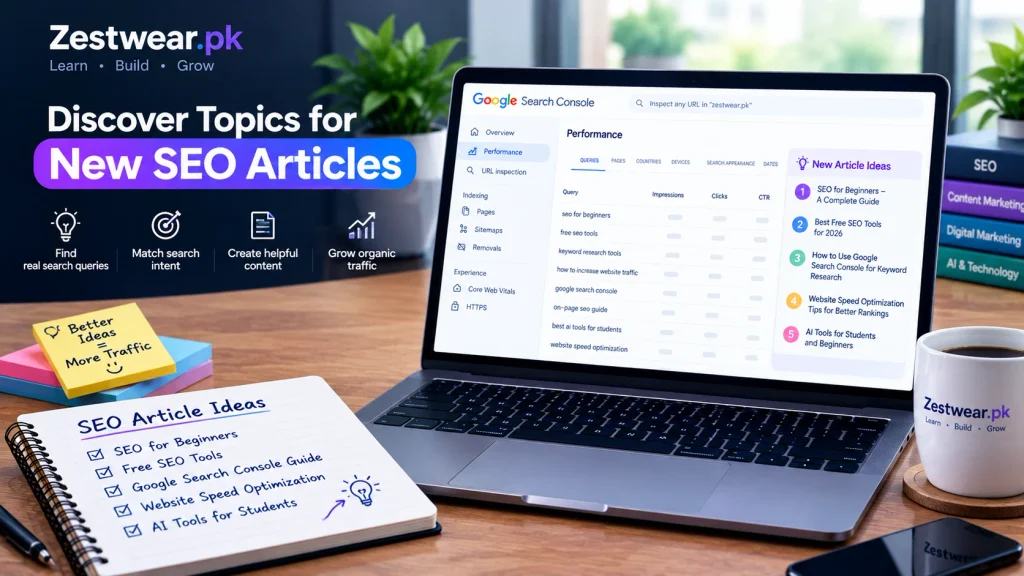
Search Console can also provide ideas for future content.
Look for relevant queries that your website appears for but does not fully answer with an existing page. Group related queries into topics before deciding what to publish.
For a website that publishes beginner-friendly SEO tutorials, potential topic groups might include:
- Keyword research and search intent.
- Free SEO tools and how to use them.
- Google Search Console tutorials.
- On-page SEO for new websites.
- Improving search snippets and CTR.
- Tracking organic traffic.
These are topic ideas, not verified low-competition keywords. Use your own data and additional research to decide which topics deserve a dedicated article.
Check Search Intent Before Writing
Search intent is the reason behind a search. A user might want to learn a process, compare tools, find a particular website, or complete a task.
Before writing a new article, search the target query in Google and review the results. Consider whether people are looking for a tutorial, a comparison, a definition, or a tool.
Create content that meets the actual need rather than writing a long article simply to include more keywords.
Step 7: Use Search Console Alongside Free SEO Tools
Search Console is useful for analyzing your website’s existing search performance, but it does not replace every other type of keyword research.
You can combine it with other free resources:
- Google Trends: Explore how interest in a topic changes over time and compare search interest across terms or regions.
- Google Keyword Planner: Discover keyword ideas and review available search-volume estimates. Access and data availability can vary.
- Google’s SEO Starter Guide: Learn the fundamentals of helping search engines understand your content.
- Your own Search Console reports: Find the queries and pages already associated with your website’s search performance.
For additional resources, link to your published Free SEO Tools guide here: [FREE SEO TOOLS].
Use different tools for different purposes. Do not assume that a keyword has low competition just because one tool suggests it has limited search volume.
Step 8: Create a Simple Keyword Tracking Spreadsheet
A spreadsheet makes it easier to organize keyword ideas and decide which pages need attention.
Create columns for the following information:
| Column | What to record |
|---|---|
| Search query | The phrase shown in Search Console |
| Related page | The URL that appears for the query |
| Impressions | How often the page appeared |
| Clicks | Clicks from Google Search |
| CTR | Clicks divided by impressions |
| Average position | The reported average position |
| Next action | Improve, monitor, or research further |
You can export available data from the Performance report and organize it in a spreadsheet.
Review the information periodically rather than making decisions based on a single day’s results. Smaller websites may have limited data, so some queries will not provide enough information for a confident decision.
Step 9: Monitor Results After Making Changes
After improving an article or publishing a new one, use Search Console to observe its search performance.
A simple process is:
- Record the page’s current performance when sufficient data is available.
- Make a specific improvement to the title, content, internal links, or another relevant element.
- Note the date and type of change.
- Review performance over a suitable period.
- Compare clicks, impressions, CTR, and average position.
- Investigate other possible reasons for changes before deciding whether the update worked.
Search performance can fluctuate because of seasonality, competition, changing search behavior, and other factors. A change in impressions or clicks cannot always be attributed to one edit.
For a newly published URL, you can use the URL Inspection tool to check Google’s indexing information and, when appropriate, request indexing. A request does not guarantee immediate crawling, indexing, or ranking.
Common Mistakes to Avoid
1. Targeting Every Query You Discover
Not every query deserves its own article. Prioritize terms that are relevant to your audience and fit your website’s content.
2. Treating Average Position as an Exact Ranking
Average position summarizes performance across impressions and queries. It is not a promise that your page will appear at the same position for every user or search.
3. Changing Titles Too Frequently
Make changes for a clear reason, such as a mismatch between the title and the content. Give search performance time to provide useful evidence before making further edits.
4. Ignoring Search Intent
A keyword can be relevant to your broad topic but still attract visitors who need a different answer. Make sure your content meets the purpose of the query.
5. Publishing Articles Only to Increase Word Count
Longer content is not automatically better. A useful article should answer the question clearly, explain important steps, and include examples or evidence where appropriate.
6. Expecting Immediate Traffic
Search visibility and organic traffic can take time to develop. Use Search Console to identify opportunities and monitor progress, not as a guarantee of quick results.
Frequently Asked Questions
Is Google Search Console free?
Yes. Google Search Console is a free service for monitoring a website’s performance in Google Search and checking information about indexing and other search-related issues.
Can Google Search Console find new keywords?
It can show queries associated with your website’s existing search performance data. It is especially useful for discovering terms that already display your pages, but it is not a complete keyword database for every possible search.
How can I find keywords with high impressions and low clicks?
Open the Performance report, review the Pages or Queries tab, and compare impressions with clicks and CTR. Investigate relevant results to see whether the title, snippet, content, or search intent needs improvement. There is no single CTR threshold that applies to every query.
Does a low average position mean I should write a new article?
Not necessarily. First inspect the query and the page currently appearing for it. Improving an existing page may be more useful than creating a duplicate article.
Does requesting indexing guarantee that Google will rank my article?
No. Requesting indexing asks Google to consider crawling a URL. It does not guarantee indexing or any particular search position.
How often should I check Search Console?
For a new website, checking periodically—such as weekly—can help you spot patterns without reacting to every daily fluctuation. The right schedule depends on how much data your website receives and how frequently you publish or update content.
Final Thoughts
Google Search Console can help website owners make more informed SEO decisions using real search performance data. By reviewing queries, identifying pages with growth potential, understanding search intent, and improving existing content, you can develop a more focused organic traffic strategy.
Start with a small number of relevant pages, make useful improvements, and monitor the results over time. Combine Search Console with reliable keyword research methods and helpful content that answers readers’ questions.
For Zestwear.pk, the goal should be to build a consistent collection of trustworthy SEO and technology guides that genuinely help visitors—not simply to publish more articles or chase a particular SEO score.