

Mastering Modern Web Development: Essential Best Practices for Scalable, Secure, and Blazing-Fast Platforms
The digital landscape is in a constant state of flux. With developers continuously seeking stability amidst the rapid evolution of tools and user expectations, it is clear that building robust online platforms today requires more than just making things function. It requires a deep commitment to engineering excellence.
We are moving away from bloated, monolithic structures and fully embracing modular, user-centric architectures. Whether you are building an ambitious media publication, a high-traffic dynamic content platform, or a complex informational portal—and specifically not just another e-commerce storefront—the rules of the game have fundamentally changed. User expectations have skyrocketed; pages must load instantly, data must be secure, and interfaces must be accessible to everyone. This comprehensive guide delves deep into the core principles and methodologies that define top-tier web development in 2026.
Modern Architecture: The Shift to API-First and Decoupling
The days of tightly coupling your backend logic with your frontend templates are largely behind us. Modern architecture heavily favors decoupling, a paradigm that is particularly effective for digital publications, tech blogs like Zestwear, and rich content platforms. This often involves utilizing a headless Content Management System (CMS) connected via robust APIs to a lightweight, highly reactive frontend framework like Next.js, Nuxt, or SvelteKit.
This separation of concerns allows content creators and developers to work in parallel without stepping on each other’s toes. The backend engineers can focus purely on data delivery and schema architecture, while frontend developers can concentrate on user experience and interface design.
A key architectural best practice is to aggressively utilize Static Site Generation (SSG) or Incremental Static Regeneration (ISR) for pages where content doesn’t change by the millisecond—such as long-form articles or documentation pages. You should fall back to Server-Side Rendering (SSR) or Client-Side Rendering (CSR) only when dynamic, user-specific data is absolutely critical to the initial page load.
Performance Optimization: Mastering the Core Web Vitals
Speed is not just a feature; it is the foundation of user retention. It directly impacts engagement metrics, bounce rates, and organic search engine visibility. Core Web Vitals are the industry gold standard for measuring real-world user experience, and optimizing them is a non-negotiable best practice.
Largest Contentful Paint (LCP) measures loading performance. To provide a good user experience, LCP should occur within 2.5 seconds of when the page first starts loading. Optimizing LCP involves prioritizing the loading of the primary above-the-fold content.
Cumulative Layout Shift (CLS) measures visual stability. Have you ever been reading an article when the text suddenly jumps down because an image or an ad loaded late? That is poor CLS. To achieve a CLS score of near-zero, developers must always include explicit width and height attributes on images and video elements.
To make this a bit more interactive and give you a hands-on feel for how these metrics interact, play around with the Zestwear Web Performance Simulator below. (Note: The text colors are explicitly hardcoded for high contrast, ensuring perfect visibility whether your system is in light or dark mode).
Security First: Implementing Zero Trust

Security cannot be an afterthought bolted onto an application right before deployment. Modern web platforms are frequent targets for automated botnets and sophisticated attacks. A “Zero Trust” architecture assumes that no incoming request, even from within an internal network, is inherently safe.
Implementing a strict Content Security Policy (CSP) is one of the most effective defenses against Cross-Site Scripting (XSS) attacks. A robust CSP ensures that only scripts, styles, and media from explicitly whitelisted domains can execute on your platform. If an attacker manages to inject a malicious script into a comment section, a strict CSP will block the browser from executing it.
When designing APIs, implementing rate limiting and robust authentication is mandatory. JSON Web Tokens (JWTs) are popular, but they must be handled correctly. Short-lived access tokens should be paired with secure, HttpOnly, Secure, and SameSite refresh cookies to prevent token theft via JavaScript.
Dependency auditing is another critical practice. Modern web projects rely on hundreds, if not thousands, of open-source packages. Automated tools like npm audit, Dependabot, or Snyk should be integrated into your repository to continuously scan for known vulnerabilities in your supply chain, alerting your team before a vulnerability can be exploited in production.
Automated Testing and CI/CD Pipelines
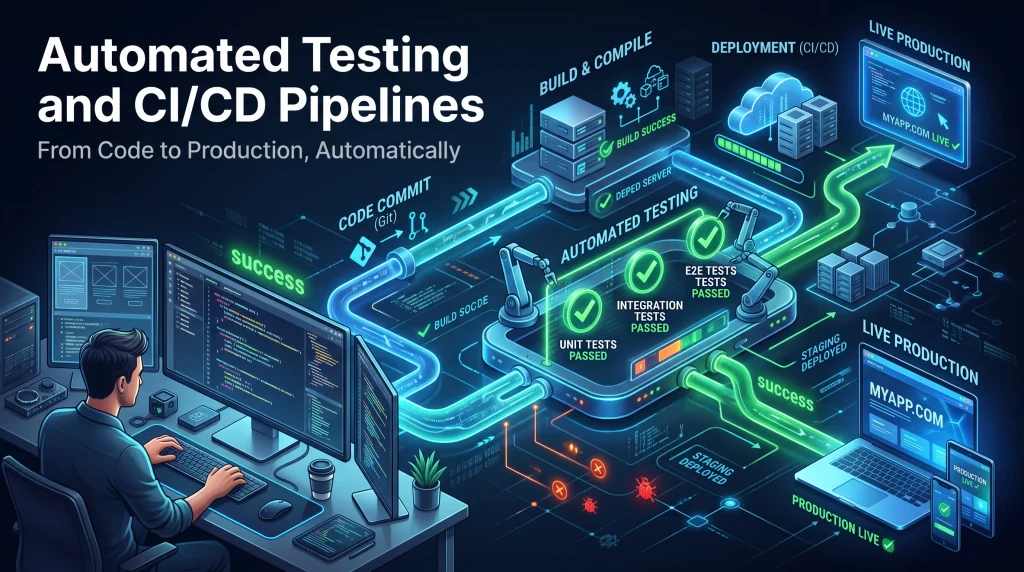
You cannot confidently deploy code on a Friday afternoon without a robust, automated testing pipeline backing your changes. A healthy testing strategy relies heavily on the “testing pyramid.” At the base, fast, isolated unit tests validate pure functions and utility logic. Moving up, integration tests ensure that your frontend components interact correctly with mock APIs, routing systems, and state stores.
Continuous Integration (CI) platforms must be configured to run this entire test suite automatically on every pull request. This blocks fragile code from being merged if coverage drops below a defined threshold or if any test fails.
To visualize the actual impact of building these automated pipelines, check out our CI/CD Time Savings Calculator below. It’s always fun to play around with the numbers and see just how many engineering hours you get back when you automate your deployments.
State Management and Data Fetching
The evolution of state management in frontend frameworks has dramatically shifted away from massive, globally accessible stores toward more localized, purposeful solutions. In the past, developers frequently defaulted to wrapping entire applications in Redux, resulting in massive boilerplate, complex data flow, and performance bottlenecks.
Today’s fundamental best practice is to strictly separate server state (data fetched from an external API, like a list of recent articles) from client state (ephemeral UI toggles, dark mode preferences, or modal visibility).
Libraries like React Query, SWR, or RTK Query handle server state beautifully right out of the box. They automatically manage complex tasks like caching, deduplication of identical requests, background data refetching, and pagination. By delegating server state to these specialized tools, client state is drastically simplified. Global client state can then be easily handled by native Context APIs or lightweight, atomic libraries like Zustand or Pinia.
Accessibility (a11y): Universal Digital Design
Building an accessible web is both a moral imperative and, increasingly, a strict legal requirement in many jurisdictions around the world. True accessibility (a11y) goes far beyond just adding alt tags to images—although that remains a critical first step. It involves crafting a seamless, intuitive experience for users relying on alternative input devices, keyboard navigation, or specialized assistive technologies.
Best practices dictate utilizing semantic HTML elements (<article>, <nav>, <aside>, <main>) rather than relying on a meaningless soup of <div> and <span> tags. Semantic HTML naturally provides crucial context and structure to assistive technologies without requiring extra effort.
Design considerations are equally important. Color contrast must be meticulously checked to meet WCAG (Web Content Accessibility Guidelines) AA or AAA standards. This ensures that text remains legible against varied backgrounds, which is particularly essential when implementing custom themes and custom widgets.
The Future is Fast and Secure
Web development is an ever-shifting discipline, constantly refined by new technologies and evolving user demands. However, the core tenets of performance, security, accessibility, and modular architecture remain absolute constants. Adhering to these modern web development best practices doesn’t just result in cleaner code; it fundamentally transforms and improves the experience for the end-user. By applying them thoughtfully and consistently across your digital platforms, you build spaces that are as robust and scalable as they are engaging.