


Why PCs Are Better Than Laptops: The Truth About the Performance Gap
If you have ever bought a high-end laptop featuring an Intel Core i9 or AMD Ryzen 9 paired with an Nvidia RTX GPU, opened a demanding 4K game, or launched a heavy 3D rendering project—only to wonder why it felt sluggish while sounding like a jet engine—you are not alone.
For years, I fell for the exact same marketing hype. I assumed that having top-tier specs inside a sleek, mobile chassis meant I wasn’t compromising on raw computing power. I believed that modern engineering had finally closed the gap between portable machines and desktop workstations, allowing power users to enjoy full performance on the go without sacrifice.
I was dead wrong.
After using both high-end laptops and custom-built desktop PCs side-by-side for heavy gaming, video editing, and daily multitasking, I came to a harsh realization: the modern laptop concept is a fundamental performance compromise. When analyzing Desktop vs. Laptop performance, most consumers fail to realize that laptops are a massive performance downgrade—even when both devices feature identical specification names on paper.
Here is the technical reality based on my personal experience with both devices, and why a “same spec” laptop will never truly match a desktop PC.
1. The TDP Difference: Wattage Equals Real-World Performance
The biggest misconception in modern consumer tech stems from component naming conventions. A graphics card or processor inside a laptop does not share the same physical silicon capabilities or power limits as its desktop counterpart. When silicon manufacturers label a mobile GPU with the exact same numerical designation as a desktop card, it creates a false equivalence in the mind of the buyer.
The primary technical driver behind this performance gap is Thermal Design Power (TDP)—the maximum amount of power allocated to a component under sustained load:
- Desktop Nvidia RTX 4090: Draws between 450W and 500W of power continuously under full workload.
- Laptop Nvidia RTX 4090 Mobile: Artificially hard-capped between 150W and 175W maximum to prevent rapid battery drain and severe overheating.
POWER ALLOCATION & WATTAGE LIMITS (TDP):- Desktop PC (Nvidia RTX 4090): 450W – 500W- Gaming Laptop (Nvidia RTX 4090 Mobile): 150W – 175W Max
Silicon compute capacity is mathematically bound to power delivery. You cannot feed a graphics processor one-third of its intended electrical power and expect equal frame rates, rendering speeds, or mathematical processing throughput. To keep laptops portable and battery-conscious, manufacturers must use physically smaller chip dies, lower CUDA core counts, narrowed memory bus widths, and heavily downclocked core frequencies.
POWER ALLOCATION & WATTAGE LIMITS (TDP):
– Desktop PC (Nvidia RTX 4090): 450W – 500W
– Gaming Laptop (Nvidia RTX 4090 Mobile): 150W – 175W Max
Silicon compute capacity is mathematically bound to power delivery. You cannot feed a graphics processor one-third of its intended electrical power and expect equal frame rates, rendering speeds, or mathematical processing throughput. To keep laptops portable and battery-conscious, manufacturers must use physically smaller chip dies, lower CUDA core counts, narrowed memory bus widths, and heavily downclocked core frequencies.
While they share the same marketing label on the retail box, a flagship laptop GPU’s real-world performance aligns closer to a mid-range desktop card (such as an RTX 4070 Ti) than a true desktop flagship. Power delivery limits set an unbreakable ceiling on mobile hardware performance long before the user even boots up a demanding application.
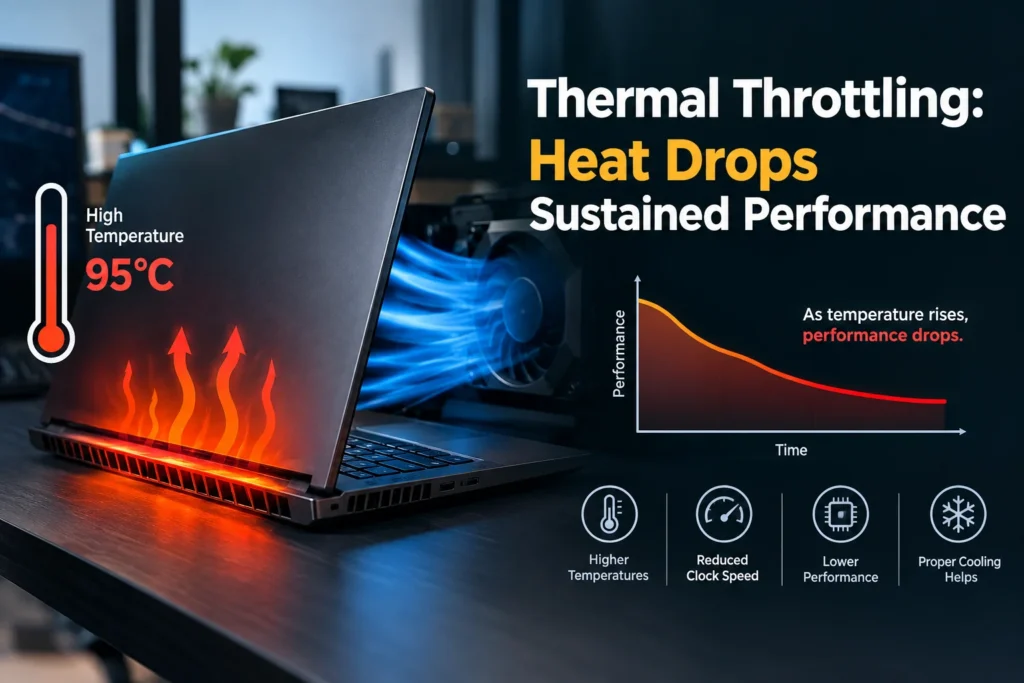
2. Thermal Throttling: How Heat Degrades Performance Over Time
When a laptop CPU or GPU runs a sustained heavy task, internal temperatures rapidly spike to its maximum operating limit (typically 90°C to 100°C) within seconds. To prevent permanent physical hardware destruction, the system triggers thermal throttling—an emergency safety protocol that automatically slashes clock speeds and drops operating performance mid-task.
During testing, my desktop PC sustained maximum 3D rendering speeds for hours without dropping clock frequencies, utilizing thick aluminum heatsinks, liquid cooling radiators, and 120mm high-airflow fans. In contrast, my laptop lost 20% to 35% of its performance within 15 minutes as heat saturated the small internal vapor chambers. Laptops don’t just run hotter—they actively slow down the longer you run intense tasks.
This thermal degradation significantly impacts the user experience during long gaming sessions, 4K video exports, or batch image processing. While a benchmark run during the first minute of startup may look impressive on a review site, real-world productivity relies on sustained performance over hours—an area where laptops consistently fail due to rapid thermal saturation.
3. Workstation Ergonomics, Thermal Comfort, and Fan Acoustics
Using a laptop as a fixed daily workstation introduces significant physical and environmental compromises that affect health, posture, and focus over extended working hours:
- Posture & Cervical Strain: Because the laptop display is physically tethered to its keyboard deck, looking down at the screen induces severe neck strain unless raised on a stand—which then renders the integrated keyboard unusable without an external mouse and keyboard set.
- Surface Heat Discomfort: High sustained workloads generate intense heat through the aluminum keyboard palm rests, leading to uncomfortable thermal feedback and sweaty palms during long working or gaming sessions.
- High-Pitched Fan Acoustics: Compact 40mm and 50mm laptop fans must spin at high RPMs to force air through tiny ventilation slits, producing a high-pitched whine that cuts through open-back audio setups and causes constant acoustic distraction.
A desktop tower sits under or adjacent to your desk. Large 120mm or 140mm intake fans move larger air volumes at low RPMs, keeping system acoustics virtually silent under heavy utilization. This separation of display, input devices, and computing hardware creates a healthier, quieter, and far more comfortable workspace.

4. Why PCs Last Longer: Upgradability, Repairability, and Total Cost of Ownership
Evaluating long-term computing value requires comparing modular hardware design against single-point failure architecture:
Modular Upgradability
On a desktop PC, every core component is independent and modular. If you require faster graphics processing three years down the road, you swap out the GPU. If memory requirements increase, you snap in additional RAM modules. On modern laptops, RAM, storage chips, and Wi-Fi modules are frequently soldered directly to the motherboard, eliminating future upgrade paths completely and forcing users to replace the entire system prematurely.
Repairability vs. Total System Failure
If a power delivery chip shorts out on a desktop motherboard, you replace that single motherboard or power supply for a fraction of the system cost. If a single power component shorts on a laptop motherboard, the entire mainboard must be replaced—often costing as much as a brand-new laptop. This design philosophy turns laptops into disposable consumer electronics rather than long-term productivity investments.
Price-to-Performance Ratio
Laptops carry a steep cost premium for spatial miniaturization. A laptop capable of respectable mobile performance costs $2,500 to $3,500+. For that identical budget, a custom desktop build yields 50% to 70% higher real-world performance, alongside a high-refresh monitor, ergonomic mechanical keyboard, and long-term expandability.
Summary Key Takeaways
- Desktop vs. Laptop Performance: Desktops provide unthrottled performance, wider memory bandwidth, and higher sustained clocks due to unrestricted power delivery and massive voltage support.
- TDP Limits Drive Real-World Output: Laptop silicon operates at a fraction of the wattage (TDP) of desktop hardware, capping raw performance regardless of product naming.
- Thermals Dictate Sustained Speed: Tiny laptop cooling setups trigger thermal throttling during prolonged workloads, whereas desktop thermal capacity maintains peak clock speeds continuously.
- Longevity & Total Cost: Desktop PCs last significantly longer due to modular repairability, simple component upgrades, and lower replacement costs over a multi-year lifecycle.
Final Thoughts: Choose the Right Tool for Your Workflow
Laptops remain essential devices if you strictly require mobility. For frequent travelers, mobile professionals, or students moving between classrooms, portable computing is mandatory and unbeatable.
However, if your laptop spends 90% of its operating life stationary on a desk plugged into an AC outlet, you are sacrificing performance, money, thermal comfort, and longevity for portability you do not utilize.
When looking past marketing labels and spec sheet tricks, the conclusion is undeniable: for raw compute power, sustained workloads, and maximum long-term value, a desktop PC remains the superior standard.